Saturday, November 5, 2016

Coveo facets error

Coveo Facets Error 


So, you are on September release of coveo components and you do not have tab component on your search view.  You now want to add coveo facet or the view, which was added fine, but the facet though indexed and pointing to correct field, it would either not render fine on view, what would you do ??? 
I tried doing the below...
  • Checked conside and tried to debug error 
    •  Actual Error - 'Value can not be null or empty ' 
  • What value is coveo asserting for ?checked call stack,  nothing important is missing 
  • Checked Presentation Details and ensured that everything is set correctly. 
  • Dropped facet component , no error any more ...??
  • Slack conversation with Coveo team , no break through!!!! They asked to check if I am not hard coding 'Model .ID' like plain text, but, nope we were doing things the correct way. 


What else ??? Google should have been my first resort, but I like to do basic checks first, seems like I should follow the reverse order. 
Found below link and seemed very much related, so gave it a shot.  That's it!!!
It started working. Yippeeee!


Hope, this would help some one battling this issue and unaware that it is a known issue on September release. 

Few Screen Shots of Error for reference 


Sunday, October 16, 2016

Sitecore Tagging Surprises


Sitecore tagging is immensely powerful out of the box starting Sitecore 7+.  You can tag any items( including bucketed items)
The below links will get you started on the basic features -

https://visionsincode.wordpress.com/2014/11/16/tagging-is-fun-in-sitecore/

https://community.sitecore.net/technical_blogs/b/sitecore_7_development_team/posts/content-tagging-with-sitecore-7

https://doc.sitecore.net/sitecore_experience_platform/content_authoring/managing_items/general/add_a_tag_to_an_item

Now, coming to the surprises...


  1. While working with the basics,  the __Semantics field on my local sitecore instance did not look anything like the articles explain.  After some pondering,  it turns out my 'raw' view was checked.  So, for the multi-value search field to behave and allow selection as expected make sure this is unchecked.
  2. After adding some new tags into tag repository(),  when i go back to tagging section of my item, I did not see the newly added tags in the selection list.   This is because tagging depends and reads from indexes.  when i re-built my indexes, I could then see the new one's
  3. Since, tagging is so dependent on indexing,  selecting a good indexing strategy is very important.  Doing this operation only as often as needed and not overdoing goes long way.
To tackle #3,  it would be handy to know the default indexing strategies on master and web databases.  For master, the default is syncMaster and for web database, the default strategy is onPublishEndAsync.   You can apply different one's as needed, but, in our case the defaults would just do it. 

You can read more on indexing strategies available through Sitecore OOTB on the below article, Good reads. :)


https://doc.sitecore.net/sitecore_experience_platform/setting_up__maintaining/search_and_indexing/indexing/index_update_strategies

https://community.sitecore.net/technical_blogs/b/sitecorejohn_blog/posts/sitecore-7-index-update-strategies

https://doc.sitecore.net/sitecore_experience_platform/setting_up__maintaining/search_and_indexing/indexing/rebuild_search_indexes

Thursday, October 13, 2016

Sitecore URL Duplication

Sitecore is amazing when it comes to how it can resolve a URL seamlessly to an item and how we can tune that based on requirements and project demands.
In most of the blogs out there - Good reads
https://jammykam.wordpress.com/2015/07/13/seo-friendly-urls-in-sitecore-prevention-is-better-than-cure/  - My Fav
http://reinoudvandalen.nl/blog/using-replacement-characters-in-sitecore-the-right-way/
https://www.cmsbestpractices.com/add-seo-value-by-replacing-spaces-with-dashes-in-sitecore/

you will see how you can tackle LinkManager using  to ensure you always have a good SEO friendly URL using <encodeNameReplacements> and how to avoid the side effects of this by ensuring we do not allow hyphen in item names using "InvalidItemNameChars"

Now, there are other problems we will have to deal with.  Google does not like duplicate content, which means when two URL's yield same result, in our case render same item content.  It means it is duplication.

But, though spaces are replaced by hyphens internally, it does not do anything when user or say some refferal link some where actually has spaces
For example - www.domain.com/test%20page and www.domain.com/test%20page would yield same page/content

Not Good...Google would not like it!

So, good SEO options are either do a 404 on space version(%20) above or do a 301 re-direct.  Canononical links might help a little if you cant do both of the above.

You could also you IIS re-write rules to replace spaces with '-' instead of %20

Wait for more...


Item Publish and Save Random Errors(Coveo)

Sitecore Item Publish and Save Errors

One day, though I did not do any specific config level changes, I started getting lot of errors, items were not saving, publish was not happening.  Same object reference errors on every single major operation on my sitecore instance.
I looked at the logs and see bunch of Coveo related errors, Yes, I had Coveo installed on this instance.  I ran the diagnostic tool of Coveo and see bunch of services having issues.  Even the indexing was broken.  It seems Coveo patches on to lot of Item pipelines like save, publish, etc.,
To debug this, there are few common steps you need to do and for most cases below should work.
In my case, I was using Windows Credentials for Coveo services and I had changed my password. ;)
But, it could be other service related issues that could be causing it -  So, the traditional magic steps are -

1. Ensure Coveo Diagnostic is all green
2. Go to Windows Services and ensure all Coveo services are up and running.
  Note - Some times the services show up as running, but, infact they would be broken.  When issues persist, try to stop and restart service after ensuring credentials are correct.
3. Tip - wait for few seconds before starting the service after you stop it
4. Re-index all Coveo Indexes
5. Check Diagnostics again to ensure

These steps should help most of issues specifically when everything is installed correctly initially.
As always Coveo first time install is always rough on newbies.  But, slowly you will get good hang of it, once you know the components.

Good Reads -
https://developers.coveo.com/display/public/SitecoreV3/Troubleshooting+Problems+Using+the+Coveo+Diagnostic+Page;jsessionid=2E0BEDF7A39D390CB791743AAE57FF87

https://developers.coveo.com/display/public/SitecoreV3/Resolving+Coveo+for+Sitecore%27s+Most+Common+Issues

Thursday, September 29, 2016

Multi line Field With Embed code Experience Editor Issues

Media Media Media!!!!

Every website has media like videos for example where the brand and the company want to showcase and put their best foot forward. 

To Enhance content author experience, we thought it was a good idea not to give them the whole RTE, but, instead to avoid any more thinking than needed and to avoid experimentation, we though multi line text field was best option.  So, the content author can grab the embed code from where ever and toss it on the field we would suggest to them. 

All was good, jumped on with implementation, only to see that this field with embed code behaves totally wierd on page editor/experience editor mode sitecore 8.1 /Update 2. 

I researched else where saw nothing about this and decided to log a sitecore support ticket, it  turns out that starting sitecore 7.2, Experience editor trims any tags on multi line text field for security purposes. Bummer!! Sitecore advised us to to RTE instead, but, due to third party we were using even that was not a possibility as the embed code had video tags and script tags.  

We moved towards using basic fields as parameters that we would need like Video ID, Account ID, etc and ended up constructing the html on partial view.  So far so good. 

More reference details on why multi line field would not work on latest editions of sitecore from support - 
Sitecore encodes all tags in the single-line/multi-line text fields when you edit it in Experience Editor application and it's an expected behavior.
This behavior was implemented since Sitecore CMS 6.6:
-Page Editor
 In 6.6 Update-3, the <renderField> pipeline was modified to HTML encode the field value when rendering single-line/ multi-line text fields (ref. no. 327905). This did not work correctly in the Page Editor which displayed the encoded value. And if the user saved the page, the already encoded value would be HTML  encoded again. (384997)

Monday, August 8, 2016

TDS - Set up Deploy Steps

TDS Useful Feature 


For those who always would need to publish after deploy using your favorite tool out there, TFS/Team City etc.,  There is a out of box feature that TDS offers to publish all items included in the project.  This means you dont have to login and publish post deployment which is usually the case. 

I tested this out and it actually works pretty awesome. 
Unfortunately, there is lack of clear instructions on TDS site for this option, so I thought it is worth a blog post to provide exact steps you need to do to make this work. 

1. Go to Deploy tab of your TDS project, You should see the below options 

2. Check box as shown on the screenshot above and the most important one is step 3 
3. Ensure you have entered the string(name) of the publishing target you wish to push to post deployment.  It can have more than one as you might have realized. (Just comma separate them)

It is important to know what is the publishing target, it is not the database name as some of you might think, it is actually the name of the item(publishing target) that points to the database you wish to publish to. 

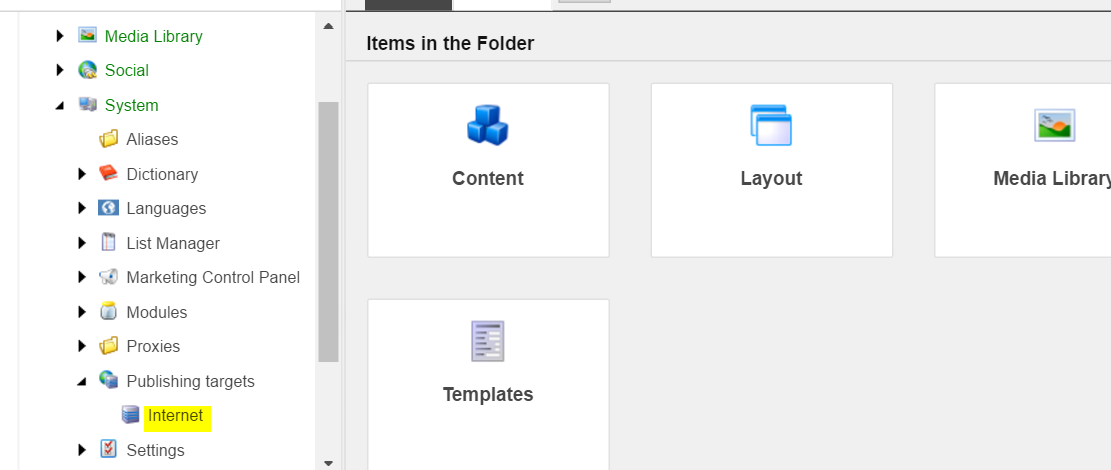
Default publishing target that comes out of the box from sitecore is called "Internet".  You can add your own or find existing one through navigating to 

Yoursitedomain.com/sitecore/admin/showconfig.aspx and searching for target or simply go to the below section 

System -> Publishing targets -> Screenshot below 


Helpful read - 
http://hedgehogdevelopment.github.io/tds/chapter4.html


Coveo - Windows 10 CES install fatal error

CES Install failure on Windows 10

I am not sure if any one encountered this before, Coveo pre-requisites on latest June 2016 version of CES failed on my local(this used to work fine before), The only change I realized this time was I am using Windows 10.  I had .netframework 3.5 enabled already, but, Coveo installer was trying to install again causing fatal error.  I could not move forward with installation.. Upon research I found the below issue on Coveo Q&A site.  I followed it and it worked.  It's kind of not fair that I need to do regedit to make CES install fine. 
I added my concern up on the below Coveo question and answers as well.  Let's see if Coveo does something for us not to have to edit the windows registry to make their product work.

More details on the link below -

https://answers.coveo.com/questions/5344/ces-fails-to-install-net-35-sp1-when-its-already-installed

Screenshot for reference on what i did to make this work.
Note - Make sure you create a system restore point and back up your original key before modification, just in case if it causes issues you can revert your changes